
What is the difference between Manager and Technician?
What it is for
There are two roles. The Manager schedules appointments and manages the team, customisation, connections and company settings. The Technician views their schedule and writes their intervention reports; they can also access the client directory and the catalogue.
Before you start
Step by step
In Team, each member shows their role. On a technician's row, the Promote to Manager icon makes them a manager; on a manager's row, the Demote to Technician icon makes them a technician again. You will be asked to confirm.
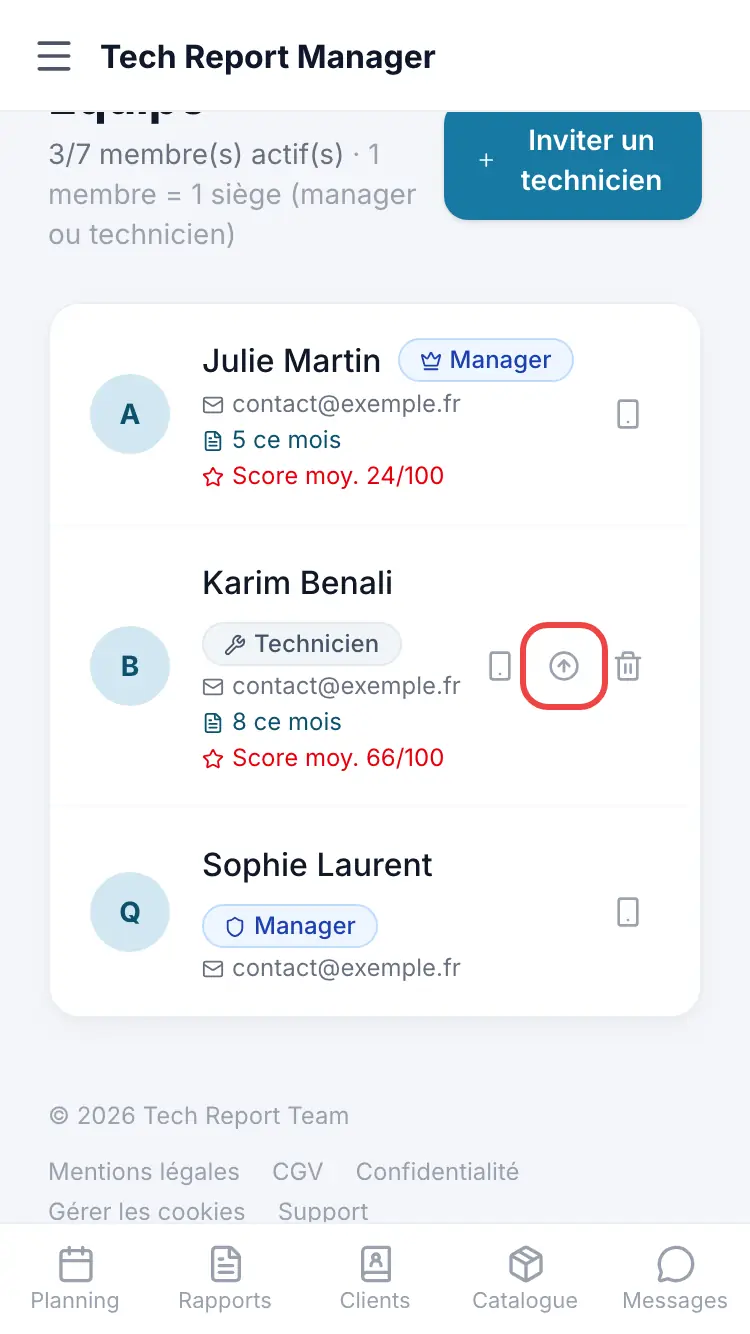
Roles on the Team page (the crown marks the account founder)
Good to know
A manager counts like a technician for seats: one member = one seat, whatever their role.
Frequently asked questions
Can a technician create an appointment?
No. They see their schedule and can use Create a report without an appointment, but only a manager creates, moves or reassigns appointments.
Can I change my own role?
No. To hand over, promote your successor first.
Can a technician delete a report?
No, deleting a report is reserved for managers.
Related articles
Need help? Our team answers by email: support@tech-report.fr
Screenshots taken on a phone, in French.