
How do I invite a technician to my team?
What it is for
Each technician has their own account: they see their appointments and write their reports from their phone. You invite them by email and they choose their own password.
Before you start
Step by step
In the menu, open Team, then tap Invite a technician.

The Team page Fill in Full name and Work email, then tap Send invitation. The technician receives an email to set their password.
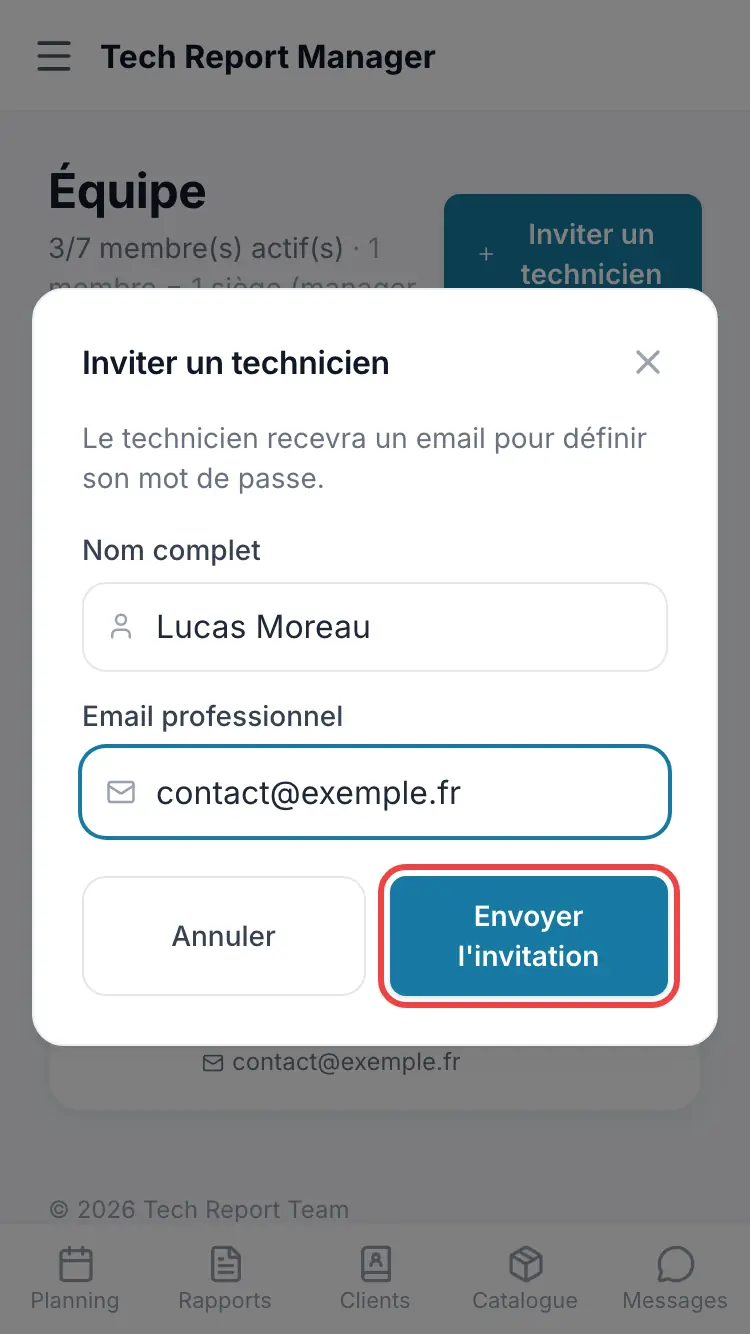
The invitation window
Good to know
The invitation link stays valid for 72 hours. After that, open Team and use Resend invitation on the technician's row.
Frequently asked questions
The “Invite a technician” button is greyed out.
All your seats are taken. Add a seat from the Subscription page, or remove a member.
My technician hasn't received the email.
Ask them to check their spam folder. Otherwise, use Resend invitation on their row in Team.
The address already has a Tech Report Manager account.
An address can only belong to one company. The person must first delete their current account, or you invite them with another address.
Can I invite a manager directly?
The invitation creates a technician account. The account owner can then promote them to manager (see the article on roles).
Related articles
Need help? Our team answers by email: support@tech-report.fr
Screenshots taken on a phone, in French.