
How do I send my invoices to Make, Zapier or n8n?
What it is for
For invoicing software without a native connection (Sage, Cegid, EBP…), an automation tool such as Make, Zapier or n8n receives your invoices and passes them on.
Before you start
Step by step
In Connections, Billing tool card, choose “Outil personnalisé (envoi JSON)”. Paste the webhook address into Receiving address (HTTPS webhook), then make up a random string of about twenty characters and type it into Secure connection key.
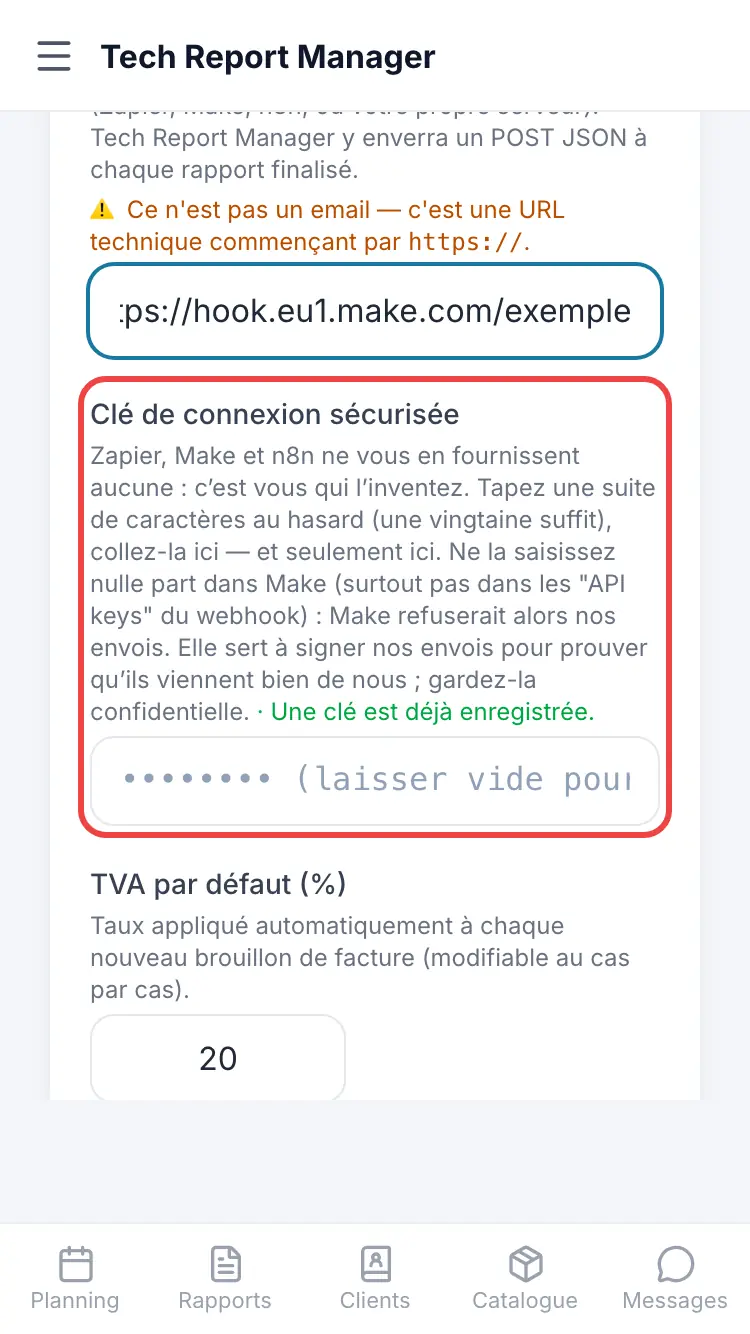
The custom tool
Good to know
The key you make up is entered NOWHERE in Make: don't put it in its webhook's “API keys”, or Make would reject our sends. It is used to sign each send (X-TRT-Signature header), which your scenario can check if it wishes.
Frequently asked questions
When is the invoice sent?
When you tap Send to my tool on an approved invoice. Nothing is sent when the report is finalised.
I pasted an email address and the field rejects it.
The field expects a technical address starting with https://, provided by your automation tool.
Make rejects the sends.
Remove the key from the webhook settings in Make: it must only be entered in Tech Report Manager.
Related articles
Need help? Our team answers by email: support@tech-report.fr
Screenshots taken on a phone, in French.